Run your first Temporal application with the Java SDK
- Understand the application
- Run the application
- Simulate failures
In this tutorial, you'll run your first Temporal Application using the Java SDK. You'll use the Web UI for state visibility, then explore how Temporal helps you recover from common failures.
- Explore Temporal's core terminology and concepts.
- Run a Temporal Workflow Application using a Temporal Cluster and the Java SDK.
- Practice reviewing the state of the Workflow.
- Understand the inherent reliability of Workflow methods.
Prerequisites
Before starting this tutorial:
- Set up a local development environment for developing Temporal Applications with Java
- Ensure you have Git installed to clone the project.
This tutorial uses the Maven package manager.
Application overview
This project simulates a money transfer application, focusing on essential transactions: withdrawals, deposits, and refunds. Money comes out of one account and goes into another. If the withdrawal succeeds but the deposit fails, the money needs to go back to the original account.
One of Temporal's most important features is its ability to maintain the application state when something fails - it recovers processes where they left off or rolls them back correctly. You focus on business logic instead of writing recovery code.
The following diagram illustrates what happens when you start the Workflow:
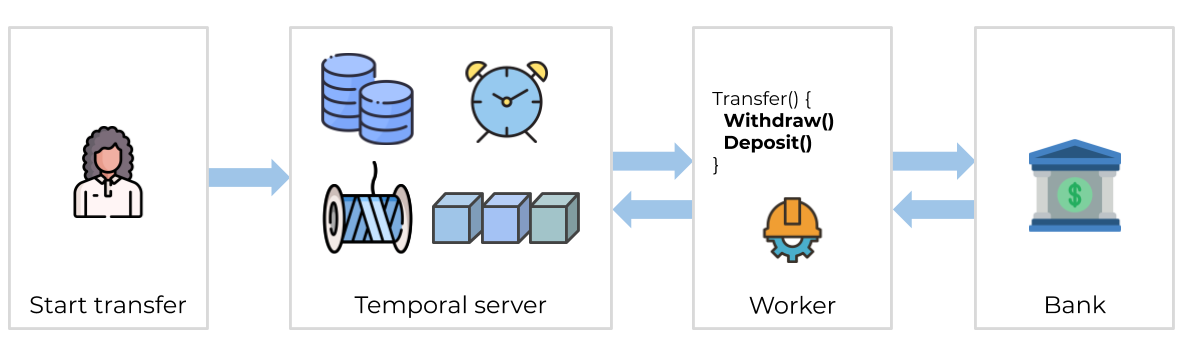
None of your application code runs on the Temporal Server. Your Worker, Workflow, and Activity run on your infrastructure, along with the rest of your applications.
Download the example application
The application is available in a GitHub repository. Clone it:
git clone https://github.com/temporalio/money-transfer-project-java
cd money-transfer-project-java
Workflow Definition
In the Temporal Java SDK, a Workflow Definition is marked by the @WorkflowInterface attribute placed above the class interface. The @WorkflowMethod attribute is placed on the transfer method - the entry point for the Workflow:
package moneytransferapp;

import io.temporal.workflow.WorkflowInterface;
import io.temporal.workflow.WorkflowMethod;

@WorkflowInterface
public interface MoneyTransferWorkflow {
    // The Workflow Execution that starts this method can be initiated from code or
    // from the 'temporal' CLI utility.
    @WorkflowMethod
    void transfer(TransactionDetails transaction);
}
The transfer method takes a TransactionDetails instance as input:
package moneytransferapp;
import com.fasterxml.jackson.databind.annotation.JsonDeserialize;

@JsonDeserialize(as = CoreTransactionDetails.class)
public interface TransactionDetails {
    String getSourceAccountId();
    String getDestinationAccountId();
    String getTransactionReferenceId();
    int getAmountToTransfer();
}
It's a good practice to send a single object into a Workflow as its input, rather than multiple separate arguments. Using a single argument makes it easier to evolve long-running Workflows.
The MoneyTransferWorkflowImpl implements the transfer logic:
package moneytransferapp;

import io.temporal.activity.ActivityOptions;
import io.temporal.workflow.Workflow;
import io.temporal.common.RetryOptions;

import java.time.Duration;
import java.util.HashMap;
import java.util.Map;

public class MoneyTransferWorkflowImpl implements MoneyTransferWorkflow {
    private static final String WITHDRAW = "Withdraw";

    // RetryOptions specify how to automatically handle retries when Activities fail
    private final RetryOptions retryoptions = RetryOptions.newBuilder()
        .setInitialInterval(Duration.ofSeconds(1)) // Wait 1 second before first retry
        .setMaximumInterval(Duration.ofSeconds(20)) // Do not exceed 20 seconds between retries
        .setBackoffCoefficient(2) // Wait 1 second, then 2, then 4, etc
        .setMaximumAttempts(5000) // Fail after 5000 attempts
        .build();

    // ActivityOptions specify the limits on how long an Activity can execute before
    // being interrupted by the Orchestration service
    private final ActivityOptions defaultActivityOptions = ActivityOptions.newBuilder()
        .setRetryOptions(retryoptions)
        .setStartToCloseTimeout(Duration.ofSeconds(2))
        .setScheduleToCloseTimeout(Duration.ofSeconds(5000))
        .build();

    private final Map<String, ActivityOptions> perActivityMethodOptions = new HashMap<String, ActivityOptions>() {{
        put(WITHDRAW, ActivityOptions.newBuilder().setHeartbeatTimeout(Duration.ofSeconds(5)).build());
    }};

    private final AccountActivity accountActivityStub = Workflow.newActivityStub(
        AccountActivity.class, defaultActivityOptions, perActivityMethodOptions);

    @Override
    public void transfer(TransactionDetails transaction) {
        String sourceAccountId = transaction.getSourceAccountId();
        String destinationAccountId = transaction.getDestinationAccountId();
        String transactionReferenceId = transaction.getTransactionReferenceId();
        int amountToTransfer = transaction.getAmountToTransfer();

        // Stage 1: Withdraw funds from source
        try {
            accountActivityStub.withdraw(sourceAccountId, transactionReferenceId, amountToTransfer);
        } catch (Exception e) {
            System.out.printf("[%s] Withdrawal of $%d from account %s failed", transactionReferenceId, amountToTransfer, sourceAccountId);
            return;
        }

        // Stage 2: Deposit funds to destination
        try {
            accountActivityStub.deposit(destinationAccountId, transactionReferenceId, amountToTransfer);
            System.out.printf("[%s] Transaction succeeded.\n", transactionReferenceId);
            return;
        } catch (Exception e) {
            System.out.printf("[%s] Deposit of $%d to account %s failed.\n", transactionReferenceId, amountToTransfer, destinationAccountId);
        }

        // Continue by compensating with a refund
        try {
            accountActivityStub.refund(sourceAccountId, transactionReferenceId, amountToTransfer);
            System.out.printf("[%s] Refund to originating account was successful.\n", transactionReferenceId);
            return;
        } catch (Exception e) {
            System.out.printf("[%s] Refund failed. Workflow will fail.", transactionReferenceId);
            throw(e);
        }
    }
}
Activity Definition
Mark a method within a class as an Activity by adding the @ActivityMethod attribute. Mark an interface as an Activity Interface by adding @ActivityInterface:
import io.temporal.activity.ActivityInterface;
import io.temporal.activity.ActivityMethod;

@ActivityInterface
public interface AccountActivity {
    @ActivityMethod
    void withdraw(String accountId, String referenceId, int amount);

    @ActivityMethod
    void deposit(String accountId, String referenceId, int amount);

    @ActivityMethod
    void refund(String accountId, String referenceId, int amount);
}
Activities are where you perform the business logic. The withdraw, deposit, and refund Activity methods call services to process money movements:
import io.temporal.activity.*;

public class AccountActivityImpl implements AccountActivity {
    @Override
    public void withdraw(String accountId, String referenceId, int amount) {
        System.out.printf("\nWithdrawing $%d from account %s.\n[ReferenceId: %s]\n", amount, accountId, referenceId);
    }

    @Override
    public void deposit(String accountId, String referenceId, int amount) {
        boolean activityShouldSucceed = true;

        if (!activityShouldSucceed) {
            throw Activity.wrap(new RuntimeException("Simulated Activity error during deposit of funds"));
        }

        System.out.printf("\nDepositing $%d into account %s.\n[ReferenceId: %s]\n", amount, accountId, referenceId);
    }

    @Override
    public void refund(String accountId, String referenceId, int amount) {
        boolean activityShouldSucceed = true;

        if (!activityShouldSucceed) {
            throw Activity.wrap(new RuntimeException("Simulated Activity error during refund to source account"));
        }

        System.out.printf("\nRefunding $%d to account %s.\n[ReferenceId: %s]\n", amount, accountId, referenceId);
    }
}
Temporal Workflows have deterministic constraints - they must produce the same output given the same input. Non-deterministic work like file or network access must be done by Activities. Use Activities for business logic and Workflows to coordinate them.
Set the Retry Policy
If an Activity fails, Temporal Workflows automatically retry it by default. You can customize how through the Retry Policy:
// RetryOptions specify how to automatically handle retries when Activities fail
private final RetryOptions retryoptions = RetryOptions.newBuilder()
    .setInitialInterval(Duration.ofSeconds(1))
    .setMaximumInterval(Duration.ofSeconds(20))
    .setBackoffCoefficient(2)
    .setMaximumAttempts(5000)
    .build();
In this example, Temporal will retry the failed Activity up to 5000 attempts, with backoff. If the deposit Activity fails, the Workflow attempts to refund the money to the source account.
Transferring money is a tricky subject, and this tutorial doesn't cover all the edge cases. In production you'd add more advanced logic - including a "human in the loop" step where someone is notified of refund issues and can intervene.
Get notified when we launch new educational content
New courses, tutorials, and learning resources - straight to your inbox.