Run your first Temporal application with the Go SDK
- Understand the application
- Run the application
- Simulate failures
In this tutorial, you'll run your first Temporal Application and explore how Workflows and Activities work together. You'll use the Temporal Web UI to see how Temporal executed your Workflow, and explore how Temporal helps you recover from common failures.
- Explore Temporal's core terminology and concepts.
- Run a Temporal Workflow Application using a Temporal Cluster and the Go SDK.
- Practice reviewing the state of the Workflow.
- Understand the inherent reliability of Workflow functions.
Prerequisites
Before starting this tutorial:
- Set up a local development environment for developing Temporal Applications with Go
- Ensure you have Git installed to clone the project.
Application overview
The project in this tutorial mimics a "money transfer" application that has a single Workflow function that orchestrates the execution of Withdraw() and Deposit() functions, representing a transfer of money from one account to another. Temporal calls these particular functions Activity functions.
To run the application, you do the following:
- Send a message to the Temporal Cluster to start the money transfer. The Temporal Server tracks the progress of your Workflow function execution.
- Run a Worker. A Worker is a wrapper around your compiled Workflow and Activity code. A Worker's only job is to execute the Activity and Workflow functions and communicate the results back to the Temporal Server.
The following diagram illustrates what happens when you start the Workflow:
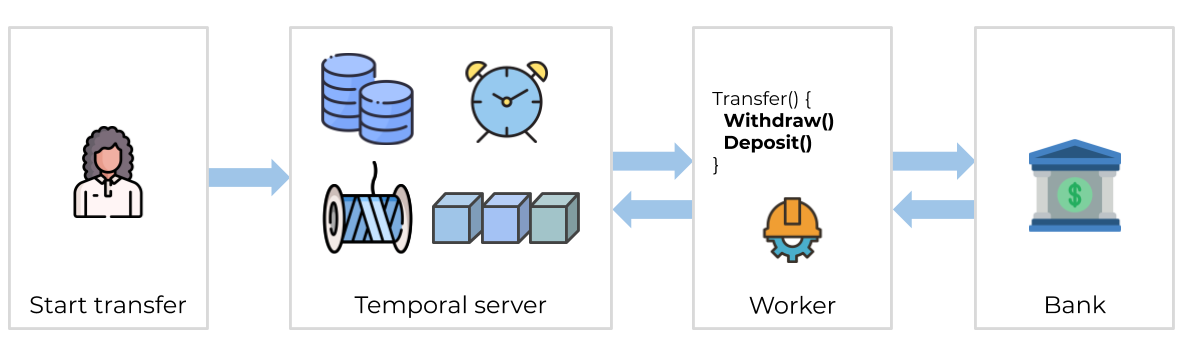
The Temporal Server doesn't run your code. Your Worker, Workflow, and Activity run on your infrastructure, along with the rest of your applications.
Download the example application
The application you'll use in this tutorial is available in a GitHub repository. Open a new terminal window and use git to clone the repository:
git clone https://github.com/temporalio/money-transfer-project-template-go
Once you have the repository cloned, change to the project directory:
cd money-transfer-project-template-go
The repository is a GitHub Template, so you can clone it to your own account and use it as the foundation for your own Temporal application. If you do, change the project name in go.mod to reflect the new repository name.
Explore the Workflow and Activity Definitions
A Temporal Application is a set of Temporal Workflow Executions, which are reliable, durable function executions. These Workflow Executions orchestrate the execution of Activities, which execute a single, well-defined action (calling a service, transcoding a file, sending an email).
The sample app models a money transfer between two accounts. Money comes out of one account and goes into another. If the withdrawal fails, there's no need to attempt a deposit. But if the withdrawal works but the deposit fails, the money needs to go back to the original account.
This is what the Workflow Definition looks like:
func MoneyTransfer(ctx workflow.Context, input PaymentDetails) (string, error) {

	// RetryPolicy specifies how to automatically handle retries if an Activity fails.
	retrypolicy := &temporal.RetryPolicy{
		InitialInterval:        time.Second,
		BackoffCoefficient:     2.0,
		MaximumInterval:        100 * time.Second,
		MaximumAttempts:        500, // 0 is unlimited retries
		NonRetryableErrorTypes: []string{"InvalidAccountError", "InsufficientFundsError"},
	}

	options := workflow.ActivityOptions{
		// Timeout options specify when to automatically timeout Activity functions.
		StartToCloseTimeout: time.Minute,
		// Optionally provide a customized RetryPolicy.
		// Temporal retries failed Activities by default.
		RetryPolicy: retrypolicy,
	}

	// Apply the options.
	ctx = workflow.WithActivityOptions(ctx, options)

	// Withdraw money.
	var withdrawOutput string

	withdrawErr := workflow.ExecuteActivity(ctx, Withdraw, input).Get(ctx, &withdrawOutput)

	if withdrawErr != nil {
		return "", withdrawErr
	}

	// Deposit money.
	var depositOutput string

	depositErr := workflow.ExecuteActivity(ctx, Deposit, input).Get(ctx, &depositOutput)

	if depositErr != nil {
		// The deposit failed; put money back in original account.

		var result string

		refundErr := workflow.ExecuteActivity(ctx, Refund, input).Get(ctx, &result)

		if refundErr != nil {
			return "",
				fmt.Errorf("Deposit: failed to deposit money into %v: Money returned to %v: %w",
					input.TargetAccount, input.SourceAccount, refundErr)
		}

		return "", fmt.Errorf("Deposit: failed to deposit money into %v: Money returned to %v: %w",
			input.TargetAccount, input.SourceAccount, depositErr)
	}

	result := fmt.Sprintf("Transfer complete (transaction IDs: %s, %s)", withdrawOutput, depositOutput)
	return result, nil
}
The MoneyTransfer function takes in the transaction details, executes Activities to withdraw and deposit the money, and returns the results.
It accepts an input variable of type PaymentDetails, defined in shared.go:
type PaymentDetails struct {
	SourceAccount string
	TargetAccount string
	Amount        int
	ReferenceID   string
}
It's a good practice to send a single, serializable data structure into a Workflow as its input, rather than multiple separate input variables.
The Withdraw Activity takes the transfer details and calls a service to process the withdrawal:
func Withdraw(ctx context.Context, data PaymentDetails) (string, error) {
	log.Printf("Withdrawing $%d from account %s.\n\n",
		data.Amount,
		data.SourceAccount,
	)

	referenceID := fmt.Sprintf("%s-withdrawal", data.ReferenceID)
	bank := BankingService{"bank-api.example.com"}
	confirmation, err := bank.Withdraw(data.SourceAccount, data.Amount, referenceID)
	return confirmation, err
}
The Deposit Activity function looks almost identical:
func Deposit(ctx context.Context, data PaymentDetails) (string, error) {
	log.Printf("Depositing $%d into account %s.\n\n",
		data.Amount,
		data.TargetAccount,
	)

	referenceID := fmt.Sprintf("%s-deposit", data.ReferenceID)
	bank := BankingService{"bank-api.example.com"}
	// Uncomment the next line and comment the one after that to simulate an unknown failure
	// confirmation, err := bank.DepositThatFails(data.TargetAccount, data.Amount, referenceID)
	confirmation, err := bank.Deposit(data.TargetAccount, data.Amount, referenceID)
	return confirmation, err
}
There's a commented line you'll use later in the tutorial to simulate an error.
If the Deposit Activity fails, the money needs to go back to the original account, so a third Activity called Refund does exactly that:
func Refund(ctx context.Context, data PaymentDetails) (string, error) {
	log.Printf("Refunding $%v back into account %v.\n\n",
		data.Amount,
		data.SourceAccount,
	)

	referenceID := fmt.Sprintf("%s-refund", data.ReferenceID)
	bank := BankingService{"bank-api.example.com"}
	confirmation, err := bank.Deposit(data.SourceAccount, data.Amount, referenceID)
	return confirmation, err
}
Temporal Workflows have certain deterministic constraints - they need to be replayable, and that makes them awkward for arbitrary business logic. Use Activities for business logic, and Workflows to coordinate the Activities.
Temporal Workflows automatically retry Activities that fail by default, but you can customize how. At the top of the MoneyTransfer Workflow you'll see a Retry Policy:
// RetryPolicy specifies how to automatically handle retries if an Activity fails.
retrypolicy := &temporal.RetryPolicy{
	InitialInterval:        time.Second,
	BackoffCoefficient:     2.0,
	MaximumInterval:        100 * time.Second,
	MaximumAttempts:        500, // 0 is unlimited retries
	NonRetryableErrorTypes: []string{"InvalidAccountError", "InsufficientFundsError"},
}

options := workflow.ActivityOptions{
	// Timeout options specify when to automatically timeout Activity functions.
	StartToCloseTimeout: time.Minute,
	// Optionally provide a customized RetryPolicy.
	// Temporal retries failed Activities by default.
	RetryPolicy: retrypolicy,
}
By default, Temporal retries failed Activities forever, but you can specify non-retryable errors. In this example there are two: invalid account number, and insufficient funds.
Transferring money is a tricky subject, and this tutorial doesn't cover all the edge cases. In production, you'd add more advanced logic - including a "human in the loop" step where someone is notified of refund issues and can intervene.
Get notified when we launch new educational content
New courses, tutorials, and learning resources - straight to your inbox.